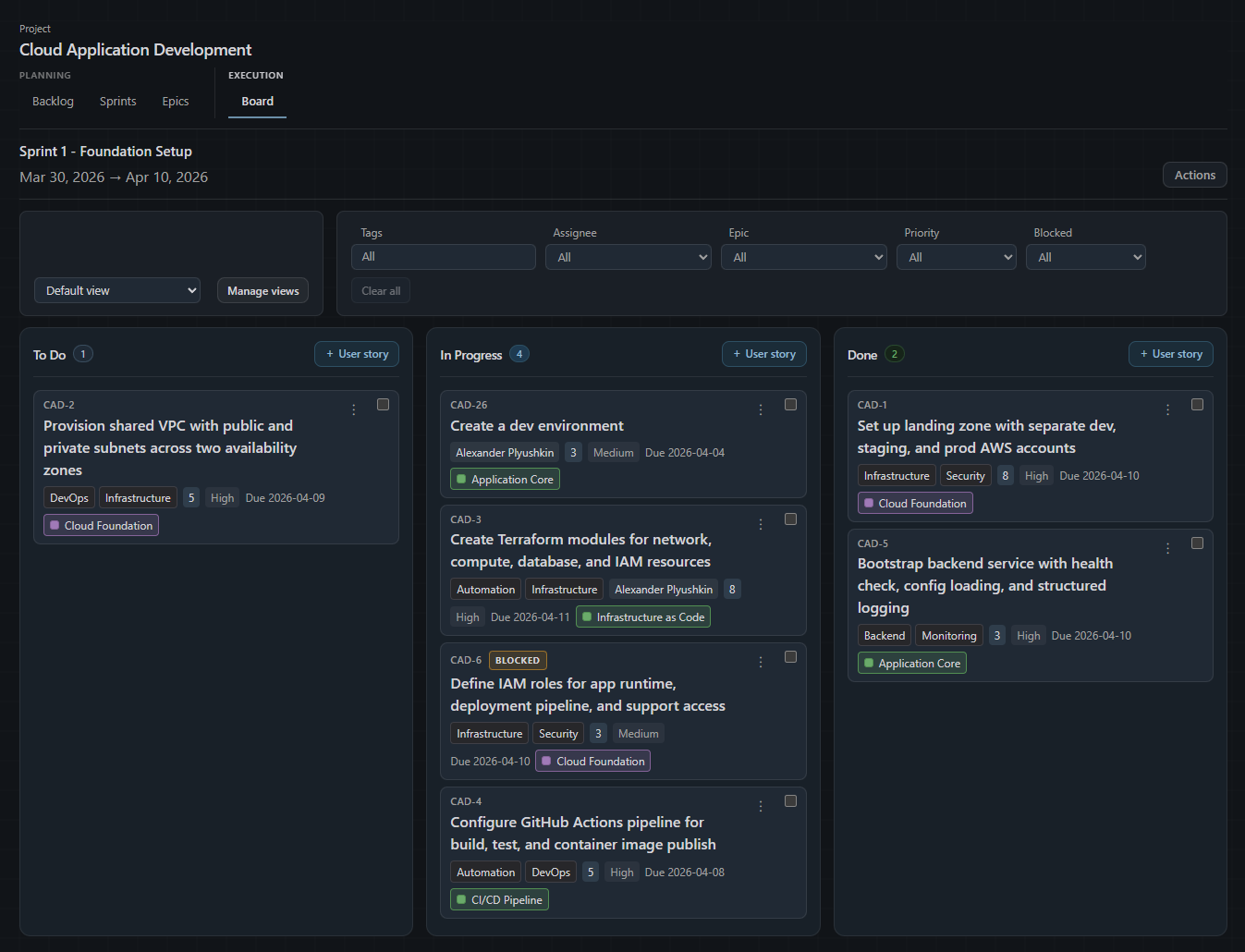
The Board is the execution view in Orvezo. It is where sprint work happens day to day: where developers see what they are working on, update story status, and track progress through the sprint. It is deliberately separate from the Backlog because planning and execution are different activities that benefit from different views.
What the Board shows
The Board shows all stories assigned to the active sprint, organized into columns: To Do, In Progress, and Done, plus an optional In Review column you can turn on per project. The sprint name and date range are displayed at the top of the board so it is always clear which sprint you are looking at.
Each story card on the board shows the story key, title, estimate, tags, assignee, priority, and epic. Stories with dependencies also show a short line such as Waiting on, Blocked by, Ready or Unblocks 2. Stories marked as blocked show a Blocked indicator so they are immediately visible without filtering. The card gives you enough context to understand the work at a glance without opening the full story detail.
Moving stories on the Board
Moving a story between To Do, In Progress, and Done changes its execution status for the sprint workflow. You do this by dragging the story card from one column to another. This is the primary action on the Board during a sprint: as work gets picked up, stories move to In Progress. As work is completed, stories move to Done.
You can also open any story by clicking on it to update fields, add a comment, attach a file, mark it as blocked, or change the assignee without leaving the Board.
Adding stories directly from the Board
Each column on the Board has an Add User Story button. Using it creates a new story and immediately assigns it to the active sprint. This is useful when something comes up during the sprint that needs to be tracked but is small enough to add without going through the backlog. Be intentional about mid-sprint additions: anything added after the sprint starts should displace something already committed, or be acknowledged as extra capacity.
Filtering the Board

The Board supports the same filter set as the Backlog: Tags, Assignee, Epic, Priority, and Blocked. These are useful in different situations. Filtering by Assignee narrows the board to one developer's work for a focused conversation. Filtering by Epic shows just the stories belonging to one workstream. Filtering by Blocked surfaces everything currently blocked so it can be addressed before standup.
Filters on the Board do not change the sprint or remove stories from it. They only change what is visible on screen. Clearing filters returns the Board to showing all sprint stories.
On the Team and Business plans, saved views work on the Board the same way they work on the Backlog. You can save a filter configuration and return to it later. A useful pattern is a saved view per developer so each person can quickly switch to their own work without manually setting filters each time.
Done on the Board versus completing a sprint
Moving a story to Done on the Board means the work is finished within the sprint context. It does not automatically complete the sprint. The sprint continues running until you explicitly complete it from the Sprints tab, regardless of how many stories are in the Done column.
Stories in Done remain visible on the Board until the sprint is completed. If you have many completed items building up in the Done column during a long sprint, you can filter them out of view using the Board filters. They are still there and still counted in sprint progress, just not visible when filtered.
Board versus Backlog sprint panel
The Board and the Backlog's sprint panel can sometimes show different stories if the sprint contexts do not match. The Board is tied to the active sprint execution context. The Backlog sprint panel shows whichever sprint is selected in the sprint dropdown on the Backlog page. If you are looking at a planned but not yet active sprint on the Backlog and then switch to the Board, you may see different stories because the Board shows the active sprint, not the planned one. This is by design: planning a future sprint and executing the current one are separate things.
On the Team and Business plans, the GitHub integration can also move cards for you: a draft pull request moves its story to In Progress, a pull request ready for review moves it to In Review, and a merge moves it to Done.